
SASSA SRD R370 Grant Application Submission Online
The South African Social Security Agency (SASSA) is delivering the SRD grant to more than 9 million clients each month. This amount counts R3.33 billion. The amount is huge, yet SASSA is helping needy people.
If you have already applied for the SRD grant, then you should go to the “SASSA status check” page and check your status. Moreover, I will help you to apply for the SRD R370 grant with the easiest guide ever.
How to Check Your SRD Grant Application Status?
Those who have already applied for the SRD grant can check their SRD status on the official website. Keep your ID number along with you and visit the SRD portal. Enter your South African ID number and phone number to get your grant application status.
What Do You Need Before Applying for the SRD Grant?
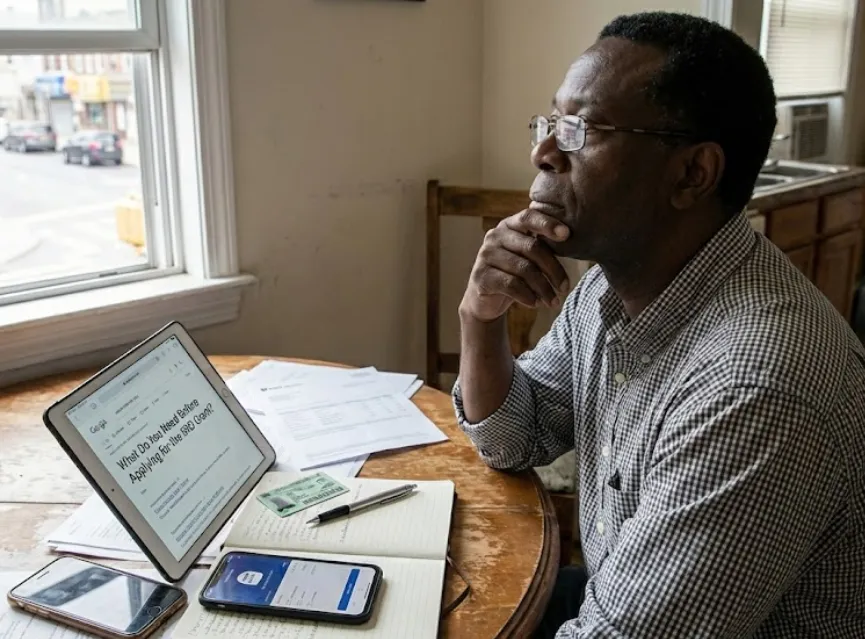
You should have the following items ready before you apply for the SRD grant.
- A fast and secure internet connection.
- A mobile phone, tablet, or laptop.
- Your South African ID number.
- Your registered cellphone number.
- Your personal details (name, surname, date of birth).
- Your residential address.
- Your banking details or your preferred payment option.
- Proof that you do not receive any other income.
- Proof that you do not receive UIF, NSFAS, or any other grant.
- A valid email address (optional but helpful).
Required Documents
Here are the documents that you need to have:
- Your South African identity card.
- Last 3 months’ bank statement.
Social Relief of Distress COVID-19 Grant Eligibility Criteria 2026
Once you have prepared all the stuff, you need to check if you qualify for the SRD grant. Check out the complete SRD grant eligibility criteria for 2026.
- You must be a South African citizen, refugee, asylum seeker, or special permit holder.
- Your age should be between 18 to 59 years old.
- You should not receive any kind of SASSA grant.
- Unemployed people will get priority.
- Bank balance should be less than R624 per month.
- Should not be living in any Government institution.
SRD Grant Application Online – Step-by-Step Guide
You can apply for the SRD grant online on the SRD web portal. Also, you can apply for the SRD grant via WhatsApp and the Moya App. Let’s find out how to apply for this grant using different methods.
Apply for SRD R370 Grant Online at Srd.sassa.gov.za
This is the most common and easiest way to apply for the SRD grant. You need to visit the SRD web portal at srd.sassa.gov.za and then follow my guidelines.
1) Visit the SRD Portal:
Connect your mobile or laptop to the secure and fast internet and go to srd.sassa.gov.za SRD portal. Make sure you are on the official SASSA portal to avoid any data security issues.
2) Click on the “Click here to apply online” Button:
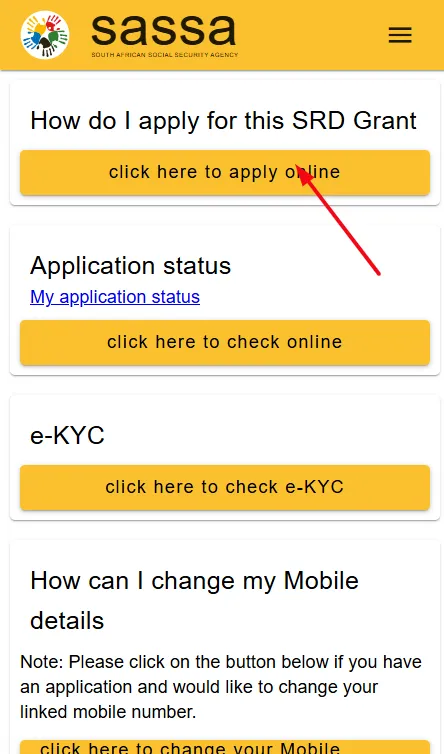
Now you need to find the button with the text “click here to apply online”. This is your way to start your registration with SASSA.
3) Verify Your Phone Number with OTP:
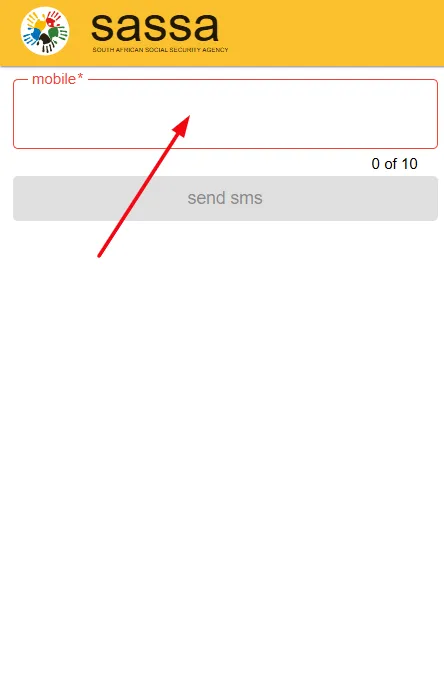
On the next page, SASSA will ask for your phone number, which you also need to verify via OTP. So input your mobile number and get an OTP via SMS on your phone. In this way, you can verify your phone number.
4) Accept the Declaration and Consent of SASSA Grant:
You need to accept the Declaration and Consent for the SASSA grant once you verify the phone number.
5) Complete the Application Form with Details:
On this page, you will be asked to enter your following details to fill out the application form.
- Name
- Email address
- Mobile number
- Gender
- Your educational level
- Disabled (Yes or No)
- Citizenship type (citizen/special permit holder/asylum seeker/refugee)
- Your last job or employment status and date
- Home address
- City
- Province
- Municipality
- District
- Ward Number
So these are the details that you need to provide. After filling this form, you need to click on the submit button.
6) Get Your Application ID Number
Now you will see a six-digit code on your screen that is your application ID or AppID. Besides this, you will get a notice from SASSA as “Your application ID is 729702. Please check that this ID matches the one SASSA gave you. Also, make sure that you are the owner of the full bank account details you submitted.”
6) Add Your Bank Account Number or Choose Payment Details:
SASSA will allow you to choose from 3 available payment receiving options to get your SRD grant payment. Here is the overview of all three options that you can pick.
1. Request Post Bank Account
This option lets you open a Post Bank account online for your SRD grant. The process is quick and easy. You fill in your details and create the account on the portal. After that, you can use this same Post Bank account to receive all your future SRD payments.
2. Capture Own Bank Account
If you already have an active bank account, then you can choose this option. You enter your bank name, account number, and branch code. SASSA checks your details and sends the money to your account each month. It is fast, secure, and offers the most comfort for many people.
3. Select Bank for Cash Send
If you don’t have a bank account or you want to create one, then go with the Cash Send option. You choose a bank that offers Cash Send services. SASSA sends you a secure SMS code after payment. You can then visit the selected bank’s ATM or partner store and collect your money with your ID and the code.
Once you have chosen the desired payment option, you need to submit the form. This is the last step to complete your SRD grant application.
How to Apply for SRD Grant Via WhatsApp?
SASSA allows clients to apply for the R370 grant on WhatsApp chat. Here are the steps for application via WhatsApp.
- Save the SASSA WhatsApp number on your mobile phone as a contact (+27 0600 123 456).
- Now open your WhatsApp account and start a chat with SASSA.
- Send a message “Hi, SRD application” and wait for the reply.
- Follow the links in the chat and fill out the application form.
- Submit the form and that’s it.
How to Apply for SRD R370 Grant Via Moya App?
Moya App is such a beneficial app for applicants of the SRD grant. You can not only apply for this grant via the Moya App, but you can also check your SASSA status via the Moya App as well.
- Download and install the Moya App on your smartphone.
- Now go to the “Discovery > Services > SRD R350 Datafree” option.
- You will be redirected to a secure link where you can start the application process.
- Submit the application and wait for the grant payment approval.
What if Your Grant Application Gets Declined or Failed?
Your application can be declined or fail if you do not qualify for the SRD grant or missing any important documents or information. However, you can get the grant application approval with the help of an appeal for reconsideration.
Follow the steps to submit your appeal for the SRD grant online.
- Go to srd.sassa.gov.za/appeals and click on the “lodge an appeal” button.
- Enter your phone number to get an OTP and verify it.
- Now choose a reason for the decline or failed status.
- Submit the appeal and wait for the approval.


