
How to Solve SASSA Login Problems?
SASSA has a services portal for all the SASSA social grants where they can create an account and find out important information and updates about the SASSA grants. However, many clients forget their username or password for that account and face problems. But not any more.
I am here to assist all of my brothers and sisters who are stuck with the SASSA login issues. I have solutions for them. Just follow my steps and solve your problems related to SASSA login or services portal registration in 2026.
What is a SASSA Services Portal?
The SASSA Services Portal is an online platform designed to make accessing social grants in South Africa easier and faster. It serves as a central hub for individuals who need information or services related to grants offered by the South African Social Security Agency (SASSA). You can access the portal directly at https://services.sassa.gov.za/portal/r/sassa/sassa/home.
The portal allows users to register a new account, which is the first step for anyone who wants to apply for a grant or manage their existing grant information online. Once registered, users can access detailed grant information, including eligibility requirements, payment dates, and frequently asked questions.
It also provides clear guidance on how to apply for grants. Step-by-step instructions help users complete applications correctly and submit them without visiting an office physically.
For those interested in social grant options, the portal offers information on all types of grants, including child support, old age, disability, and more. Each section includes links to more details about specific grants, making it easy to find the information needed.
Overall, the SASSA Services Portal is a user-friendly, reliable resource that empowers South Africans to manage social grant services online efficiently, reducing the need for physical visits and simplifying access to government support.
How to Solve SASSA Login Issues?
Let’s find out what are the most common issues that people face when they login to SASSA services portal online.
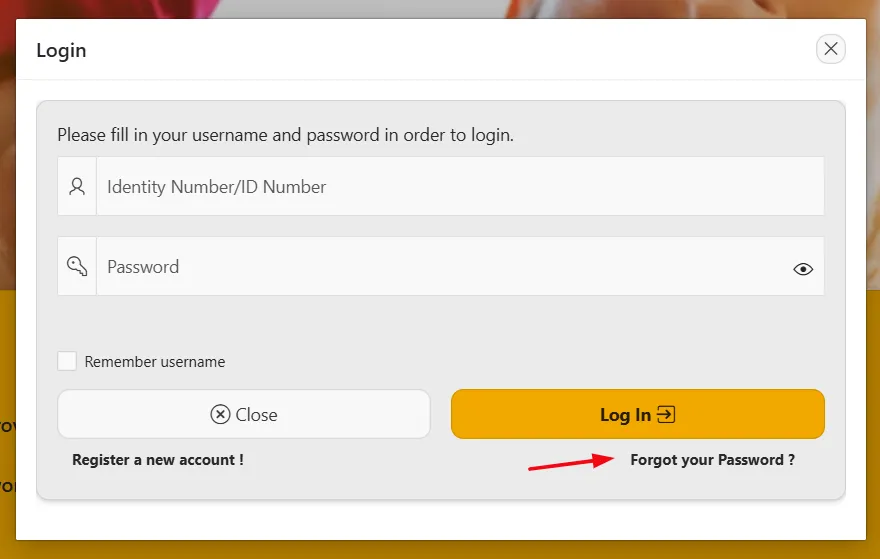
Forgot Username
Many users forget the username they used to register their SASSA account. Without the correct username, logging in becomes impossible.
Solution: Click on the “Forgot Username” link on the login page. Enter your registered email address or ID number. SASSA will send your username to your email. Make sure to check your spam folder if you do not see it immediately.
Forgot Password
Forgetting the password is very common. Without it, users cannot access their accounts.
Solution: Click “Forgot Password” on the login page. Enter your username and email address. Follow the instructions sent to your email to reset your password. Create a strong password that you can remember for future use.
Account Locked
Entering the wrong password multiple times can temporarily lock your account for security reasons.
Solution: Wait for the lockout period to end (usually 30 minutes). If the problem persists, contact SASSA support to unlock your account manually.
Email Not Receiving Reset Link
Sometimes users do not get the password reset link in their email.
Solution: Check your spam or junk folder first. If the email is not there, make sure you are using the correct registered email. You can also try requesting the reset link again after a few minutes.
Technical Errors or Website Issues
Occasionally, users face problems because of website downtime, browser issues, or slow internet.
Solution: Clear your browser cache or try a different browser. Ensure your internet connection is stable. If the portal is down, wait and try again later.
Why SASSA Services Portal Down?
SASSA Services portal is a website, and it can be down for multiple reasons. Here are some of the most common reasons:
Server Overload
The portal experiences high traffic, especially during grant application periods or payment updates. When too many users try to access the portal at the same time, the server may become overloaded. This can cause the site to respond slowly or stop working completely. Servers have a limited capacity, and if requests exceed this limit, the portal may temporarily crash.
Scheduled Maintenance
SASSA often performs scheduled maintenance to update the portal, fix bugs, or enhance security. During this time, the portal may be offline for several hours. Maintenance is essential to ensure that the system remains secure and functions properly, but users may experience temporary downtime.
Technical Glitches or Software Bugs
Like any online system, the SASSA portal can encounter software errors. Bugs in the website’s code, database issues, or incorrect configurations can prevent users from logging in or accessing information. Sometimes a minor bug can bring the portal down until the IT team resolves it.
Internet Connectivity Issues
Sometimes the problem is not with SASSA but with the user’s internet connection or local network. Slow or unstable internet can make it seem like the portal is down. Users should check their connection and try accessing the portal from a different network or device.
Cybersecurity Attacks
Portals like SASSA’s can be targeted by hackers or face Distributed Denial of Service (DDoS) attacks. These attacks flood the server with traffic, making it impossible for legitimate users to access the site. SASSA may temporarily shut down the portal to block attacks and protect sensitive user data.
Key Takeaways
- Keep login details safe and updated: Use a strong, unique password with letters, numbers, and symbols. Avoid using easily guessed passwords like your ID number or birthday.
- Use a reliable email address: Register with an active email you check regularly. Ensure you can receive password reset links and account notifications.
- Avoid repeated failed login attempts: Multiple wrong attempts may lock your account temporarily. Use the “Forgot Password” option instead of guessing.
- Use a compatible browser and clear cache: Updated Chrome, Firefox, or Edge browsers work best. Clearing cache and cookies helps prevent technical errors.
- Check your internet connection: Slow or unstable internet can make the portal seem down. Try a different network or device if the portal does not load.
- Be patient during high traffic or maintenance: The portal may be slow or temporarily offline during updates or busy periods. Wait a few minutes and try again if access is not immediate.
- Stay organized: Keep a record of your username, password, and registered email. This reduces stress and ensures smooth access to grant information.


